
How To Topic 19 · Gaming Groups
How to Create a Domino Gaming Group in HxAR
Gaming Group is currently a domino-run builder inside AR Experience. It can place styled batches on the scene floor or a selected support asset, then let a visitor topple the run. It is not yet a general game-engine editor.
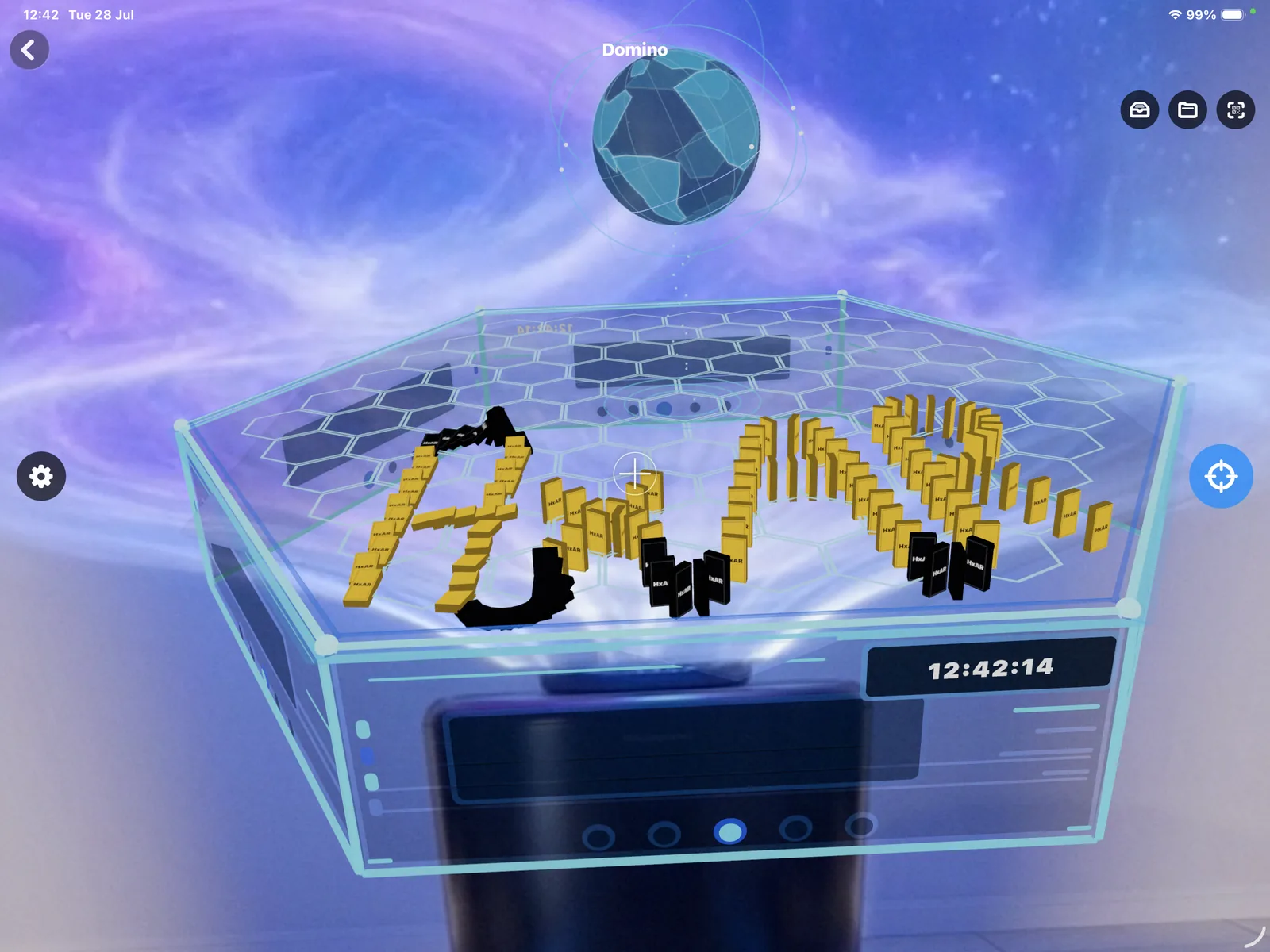
What this guide achieves
Create at least one readable, stable domino run, test Topple and Reset, and understand the 5,000-domino limit, public text boundary and immediate Clear action.
- Topic
- 19
- Starting point
- A staged local AR Experience Story with a clear scene floor or suitable support asset
- Guide time
- About 13 minutes
- Screen status
- Development feature guide
Quick walkthrough
Create and test a Domino Gaming Group in thirteen steps.
Choose a safe support and an economical batch size, place the run, adjust it and test the visitor experience before upload.
- 01
Prepare a clear support area
Arrange a scene floor or broad support asset with enough room for the proposed run and save Set The Stage.
- 02
Open Gaming
Select Animate, then Gaming. The current editor and runtime effectively use the first Gaming Group.
- 03
Open Dominoes setup
Choose the domino icon. Gaming Group currently builds domino runs rather than arbitrary game rules.
- 04
Choose the support
Use Scene floor or select a Story asset. HxAR constrains the batch’s starting point to available support bounds, but a long or curved run can still extend beyond them.
- 05
Choose colour and material
Select a named colour palette and Matte, Gloss, Metal or Glow material.
- 06
Optionally add a back name
Enter no more than 32 characters for text on the back of the next run. Use only text you are comfortable sharing publicly.
- 07
Choose size and path
Select Mini, Classic, Large or Show and Straight, Curve Left, Curve Right or Zigzag.
- 08
Set the next batch
Choose 1–100 dominoes for the next batch, 25–94 percent spacing and, for a curved route, 1–45 degrees. HxAR recommends staying at or below 2,000 overall and prevents more than 5,000.
- 09
Lay the run
Select Lay Dominoes. The new batch appears in the scene using the current style and path.
- 10
Adjust and commit
Preview the latest run’s position or selected domino, then commit it when the spacing and route look correct.
- 11
Use Undo or Clear carefully
Undo Last Run removes the newest batch. Clear removes every domino immediately and has no confirmation or undo.
- 12
Test Topple and Reset
Start the run, watch whether the links reach the next domino and use Reset. Reopening a shared Story also restores the upright starting state.
- 13
Upload and test again
A single domino satisfies the current ready check, so test the complete downloaded Shared Story before distributing its QR.
Gaming Group currently means one domino builder
The interface exposes Dominoes setup with colour, material, optional back text, size, path, support, batch count, spacing and curve controls. It does not currently author general scores, multiplayer rules or arbitrary game logic.
The Story format can contain a Gaming Group array, but the editor and runtime use the first group. Build one deliberate domino experience rather than promising multiple independent games in one Story.
At least one placed domino makes the group share-ready. That is a minimal data check, not proof that the run is visible, stable, reachable or enjoyable.
Choose a readable style and a route that fits the support
Named palettes include Red, Orange, Yellow, Green, Blue, Purple, White, Black and Rainbow. Materials are Matte, Gloss, Metal and Glow. Sizes are Mini, Classic, Large and Show; paths are Straight, Curve Left, Curve Right and Zigzag.
Place on Scene floor or choose a support asset. When HxAR can read that asset’s bounds, it constrains the starting position to the available surface, but the creator must still inspect the whole run.
Spacing and curve affect whether one falling domino can reach the next. Preview and test rather than assuming that a visually attractive route will propagate correctly.
Use a modest batch before approaching the 5,000-domino limit
Each placement batch can contain 1–100 dominoes. Spacing ranges from 25 to 94 percent and the curve control from 1° to 45°. HxAR allows up to 5,000 saved dominoes and describes 2,000 as the recommended total. Those are authoring limits, not a performance guarantee on every supported device.
Start with a small batch, test placement and toppling, then extend the run. Size, Glow material, long paths and device capability can affect responsiveness.
A Shared Story must download and reconstruct the complete Gaming Group. Test on a representative supported device and simplify the run when loading, frame rate or control response becomes poor.
Undo Last Run, Clear and Reset do different things
Undo Last Run removes the newest placed batch. Clear removes every domino immediately without confirmation or undo, so use it only after verifying the selected Story and keeping any source plan you need.
Topple starts the chain from the first domino. Reset makes the current run upright again. Reopening the Story also resets the visitor experience.
Restyle All applies the current style and back name to the whole group. Check existing creator text before using it across every domino.
Optional domino text becomes public Story content
The optional back name has a maximum length of 32 characters and is saved in the Story JSON. There is no content filter in this authoring panel.
When the owner uploads or reuploads the Story, that text and every domino placement go into HxAR’s public CloudKit Story record. Upload only content you own, can lawfully share and are comfortable making retrievable by title or QR.
Public creator text requires reporting, blocking and filtering protection. Use the website reporting route if the development preview exposes unsafe content.
Keep the virtual run away from real walking routes
Dominoes are virtual and cannot mark a safe physical boundary. Work while stationary in a clear, well-lit area, keep the device secure and do not step around furniture or people merely to follow the run.
The authoring panel uses labelled controls and named colours, but dense small text, spatial placement, dynamic domino state and performance feedback still need real-device VoiceOver, Larger Text, colour-independence and reduced-motion testing.
No separate HxElectrum or Hexagon Token charge was found for Gaming Group authoring in the reviewed build.
Guide path
Move through HxAR one topic at a time.
New topics will be linked back into earlier guides whenever one action leads naturally to another.
Helpful now