
H1Create
Images, video and remote media
Focused AR Experience guides for local images, video, remote-media URLs, YouTube players and their visitor controls.
How to use HxAR
Learn HxAR from the dashboard to the Metaverse. Follow detailed guides for World View, virtual properties, 3D design, shops and HexTiles, with screenshots and links to the next step.
Update to HxAR 2.1 on the App Store, then follow the new Metaverse, property and 3D design guides below. Check each guide’s version label when following along in the app.
HxAR 2.1 · Available now
Start with World View, then learn how to shape virtual places, create replacement buildings, set up shops and advertisements, and understand the world around you.
Personalise HxAR 2.1 with Distance Units, Colour & Display, public HxElectrum visibility and Nearby Collectables settings.
Use World View to enter the HxAR Metaverse through the 3D Earth, search locations, use Tracker View and explore virtual HexTiles in HxAR 2.1.
Explore Earth in HxAR 2.1 World View. Search, rotate and zoom into the 3D globe, then enter the HxAR Metaverse to discover HexTiles and virtual places.
Prepare a HxAR 2.1 Advert Board on your owned Public Plaza: add wording, a picture, contact details and optional Take me there directions.
Use free HxAR 2.1 Sign Posts on Public Plaza HexTiles, read nearby place directions, choose distance units and correct a shared area name.
Create a replacement for an owned Micro Mapped Property or larger mapped property using HxAR 3D Design Studio, then send, place and visit it.
Use HxAR 3D Design Studio on iPad to create a mapped-property replacement with measured surfaces, a walkable doorway, materials and facade pictures.
Prepare an HxStall, Small HxShop or VR HxShop in HxAR 2.1: check land and opening fees, stock USDZ products, preview in AR and visit business websites.
Explore HxAR 2.1 water, rivers and lakes. Learn to wade with your Avatar, recognise Sea terrain, use bridges and understand water HexTile settings.
Discover HxAR 2.1’s automatic day and night cycle, changing sunlight, Moon, stars and simulated clouds, and learn how to inspect the sky.
Use the HxAR 2.1 Options cube to change HexTile types, adjust eligible land height and find services, with clear ownership and saving instructions.
How To Topic 01 · Getting started
Learn what the top controls, GEO AR radar, rotating navigation dial, quick-access positions and EXIT control do.
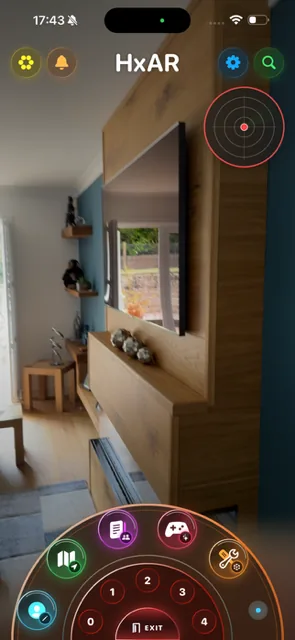
Learn how to use the HxAR 2.0 dashboard, including Hx Vault, search, GEO AR radar, navigation dials and Exit.
Continue learning
Each new guide appears here in order and can link back into earlier topics whenever one action leads to another.
Learn how Hx Vault in HxAR 2.0 handles Hexagon Tokens, HexTile Ore collection, refinement and activity, with separate guidance for development features such as Train fares.
Development guide to HxAR’s AR notification panel, unread activity, full list and separate iPhone notification settings.
Learn how the reviewed HxAR Search feature uses an AR panel to search exact property tags within 50 miles, match exact usernames and open profiles or property details.
Learn how to use the HxAR 2.0 GEO AR Radar, adjust its 1–50 metre detection radius, read nearby HexTiles and safely open a Shared Story.
Learn how to use HxAR’s AR Gallery to preview saved AR assets, organise folders, choose private or public visibility and understand the QR Gallery status.
Explore HxAR Collectables, from HexTile purchase rewards and GEO discoveries to motorbikes in AR and supported vehicles in the HxAR Metaverse.
Learn how HxAR Insights shows public analytics, Top Referrers and referral activity, and understand the unfinished promotion-code route for virtual HexTiles.
Learn how to select USDZ files, review HxElectrum upload costs, add asset details and save new AR assets as Private Only in HxAR.
Learn how to place the HxAR snooker table, practise free on one device, save a frame and play Remote 2 Player for 1 HxElectrum each.
Learn the HxAR AR Experience workflow: organise USDZ assets, start and save an AR scene, use advanced tools, upload a cloud Story and share its QR.
Learn how HxAR AR Collision Builder uses Point, Flat and 3D shapes, a 1,000-point budget, dimension guides, asset locks and device-local scene saves.
Set an HxAR scene’s opening layout, create pivot-based AR Actions, add optional stretch and visibility changes, then test both controls safely.
Add and position HxAR information labels, link them to scene assets and place the Time Machine CALL marker with optional virtual-asset collision checks.
Open a saved HxAR scene in Lighting AR, create Bulb or Panel lights, adjust colour, strength, reach and size, tie lights to assets and save safely.
Group HxAR scene assets into a Simple, Robot, Car or Bike setup, choose front and wheel roles, configure doors and lights, then test the virtual vehicle.
Build an HxAR domino run with colour, material, size, path, support surface, spacing and curve controls, then test, reset and share it safely.
Upload an HxAR Shared Story, share its QR or exact title, resolve missing assets and safely reopen a public AR experience.
Learn how to select and change all 22 active HxAR HexTile colours, protect choices with ownership and see them on Pixel Maps.
Compare Apple Standard and satellite maps, Mapbox 3D and HxAR Metaverse during a Property Visit, including defaults, controls and attribution.
Learn to walk HxAR HexTiles, stream Story assets, board and drive a virtual van, use terrain rules and approach a configured VR Building.
Create an HxAR VR Building, plan floors and rooms, add USDZ assets, images, video and Wired AR, and understand optional 2–4 person live capacity.
In the reviewed Train development feature, build a four-Railway-HexTile station, drive the Train, carry passengers and check fares in Hx Vault.
Preview the new information-board and building double-tap purchase routes, check a Micro Mapped Property’s one Anchor HexTile, and manage your HxAR building.
Create Lamp Posts on eligible Grass or Property Land HexTiles in HxAR, then adjust their direction, tilt and coverage in Lamp Post Settings.
Current-release essentials
These existing pages cover installation, permissions, safety and support for the current App Store release.
Check device compatibility, open the current App Store release and start with Sign in with Apple.
Understand why camera and location access matter, and learn where to change those choices later.
Prepare the physical space, watch for people and obstacles, and respect private or restricted locations.
Use the focused help centre for sign-in, scene downloads, permissions, purchases and account questions.
Coming into the guide library
Each guide will use real app screens, plain language and visible released-versus-in-development labels.
Focused AR Experience guides for local images, video, remote-media URLs, YouTube players and their visitor controls.
A focused walkthrough for the specialised electrical-training workspace as its interface becomes ready.