
How To Topic 41 · Rooftop games
How to Play Hex Arrow Archery in VR and AR in HxAR
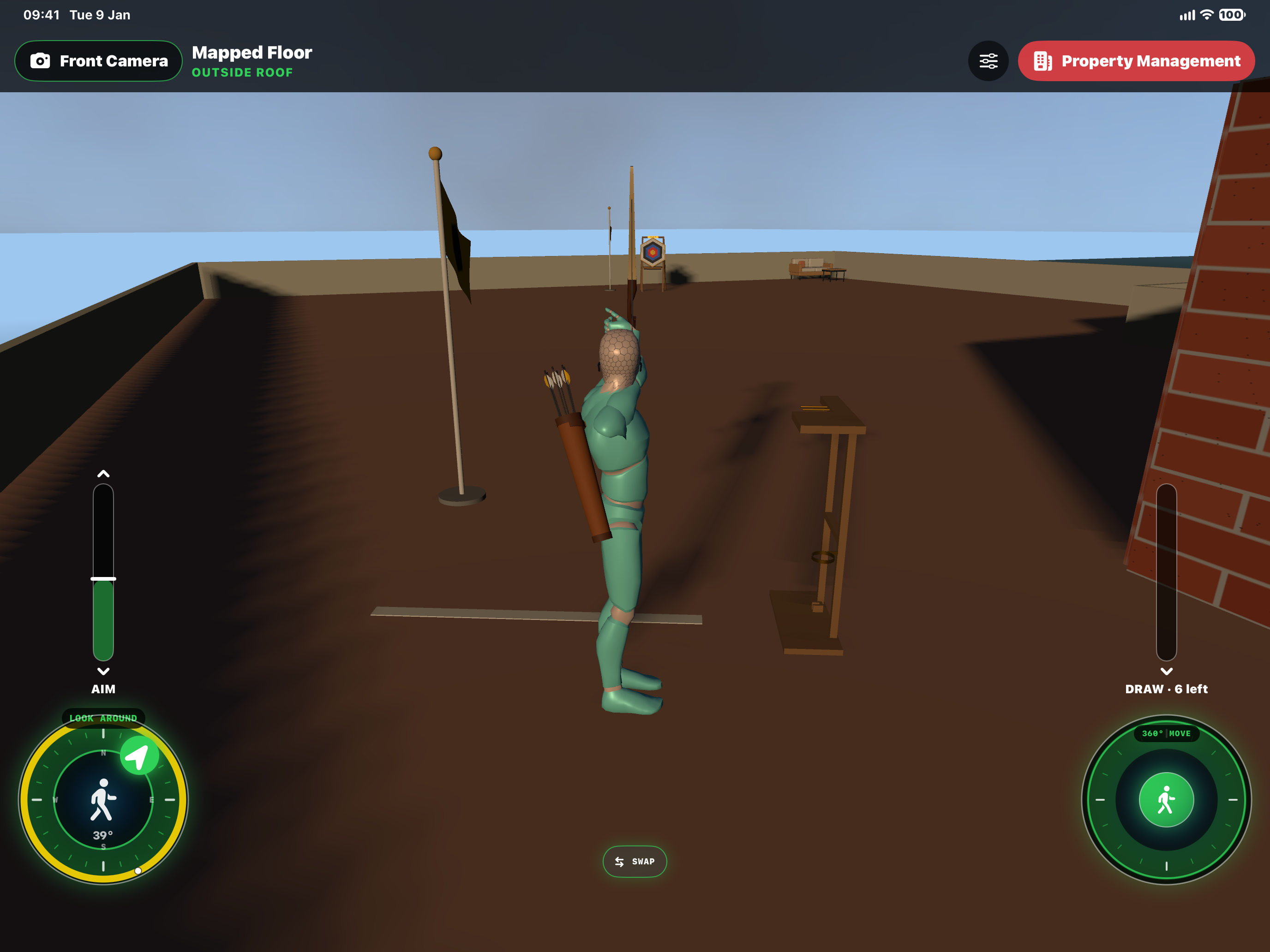
Head to the roof of a Mapped Plot for Hex Arrow, HxAR’s virtual archery game. Play at the rooftop range, watch the wind flags and try to improve your six-arrow score. Or choose Play in AR to bring the target and bow into your real surroundings, with a different way to aim and draw.
What this guide achieves
Reach the rooftop range, play a six-arrow round and understand how the controls change in AR.
- Topic
- 41
- Starting point
- A HxAR Mapped Plot with saved roof access and a Hex Arrow range installed by its owner
- Guide time
- About 12 minutes
- Screen status
- Next app update preview
Quick walkthrough
Play a rooftop round in eight steps.
These steps cover the virtual rooftop. Use the separate AR instructions below when playing through your device’s camera.
- 01
Enter the Mapped Plot building
Open your property through Property Management → Mapped Plots, or enter a building you can visit. Go to the room with the roof-access ladder. Roof access and the archery range must already be set up by the owner.
- 02
Climb to the roof room
Approach the ladder until Climb to roof room appears, then choose it. In the roof room, approach the Let’s Play “Hex Arrow” board and tap the main board to go out to the shooting line.
- 03
Stand behind the shooting line
Face the target and move close to the line without crossing it. Choose Ready an arrow when it appears. The bow starts by pointing in the direction you face, and walking pauses while you aim.
- 04
Aim and check the wind
Use LOOK AROUND to turn towards the target. Near its centre, a yellow ring indicates finer aiming. Drag AIM up or down to raise or lower the bow. Watch the two wind flags and adjust your aim.
- 05
Draw and release
Pull the DRAW bar down, then let go to shoot. More draw sends the arrow faster, and the control allows a pull beyond full draw. To put the bow away without firing, tap the bow rack or your quiver.
- 06
Read the result and shoot again
After the arrow lands, read the result and the rooftop scoreboard. The bow lowers so you can walk again. Return behind the line and choose Ready an arrow for the next shot.
- 07
Finish the six-arrow round
Each round has six arrows. The scoreboard records their results, the total and your device’s best completed round for this roof and target distance. A better completed score is recorded automatically.
- 08
Collect the arrows or leave the roof
When the round is over, walk your Avatar to the target and choose Collect arrows. This refills the quiver and starts a new round. To leave, return to the roof door, choose Enter roof room, then approach the ladder and choose Climb down.
For owners: set up Hex Arrow on the roof
Use a Mapped Plot with suitable saved roof access. If access is missing, select a room on the eligible top floor in the floor-layout editor, save any floor changes and choose Add or Edit Roof Access. Fit the rooftop room, ladder and exit door, then choose Save Roof Access. A roof that cannot accommodate the layout cannot use that setup.
Climb the ladder, then use Go onto roof at the roof-room door. Stand where you want the shooting line and face a clear stretch of the terrace. Open Room Settings; outside on the roof the panel is titled Terrace Settings.
Enable Hex Arrow archery range and choose Target distance. The supported range is 5–60 metres, but the slider is limited to what fits from your position and direction. The target, bow rack, both flags, shooting line and door approach need clear space.
Choose Save Settings and resolve any refusal before trying to play. A saved line stays in place when you reopen the settings. To relocate it, stand at the new position, face the intended direction and choose Move the shooting line to where I stand, then save again.
The range adds a Let’s Play “Hex Arrow” board inside the roof room. The main board opens rooftop play; the smaller PLAY IN AR plaque opens the camera-based version.
VR rooftop controls: aim, draw and allow for wind
Rooftop play happens in the virtual HxAR building. Ready an arrow equips the Avatar at your current position near the shooting line. Face the target before choosing it; readiness does not automatically turn every shot towards the centre.
LOOK AROUND controls left and right aim. Within 5° of the target centre, the yellow ring marks fine aiming: each dial step adjusts the direction by 0.01°. AIM controls elevation, while DRAW controls the pull of the bow.
Pull DRAW down and release to loose the arrow. A stronger draw produces a faster shot. The near and far flags show the game’s simulated wind; use them to judge an adjustment rather than assuming the same aim will always hit the same point.
Tap the information button beside Ready an arrow for the in-app instructions. If you change your mind while aiming, tap the rack or your quiver to lower the bow.
Six arrows, ring scores and your best round
The target scores gold as 9 or 10, red as 7 or 8, blue as 5 or 6, black as 3 or 4, and white as 1 or 2. An arrow in the straw scores zero. The game also reports a missed target, a short shot or an arrow lost over the parapet.
The rooftop scoreboard shows each arrow and the round total. Your best completed round is stored on this device for that particular roof and target distance. It is not a shared online leaderboard.
After the sixth arrow lands, walk your Avatar close to the target to make Collect arrows available. Collecting clears the current round and returns six arrows to the quiver. You can then walk back to the line and try again.
Place Hex Arrow in your real surroundings with AR
Choose Play in AR beside Ready an arrow on the roof, or tap the PLAY IN AR plaque beneath the roof-room board. This needs a device that supports AR world tracking and a valid Hex Arrow range on the property.
Use a clear, level real space with room to move safely behind you. Move the device slowly while it detects a horizontal floor, then stand where you want to shoot and choose Target distance, from 5 to 60 metres.
Tap the detected floor a few steps ahead in the direction you want the target. That tap sets the direction: the shooting line is placed beneath you, and the target appears at the chosen distance ahead. The target is not placed exactly where you tap.
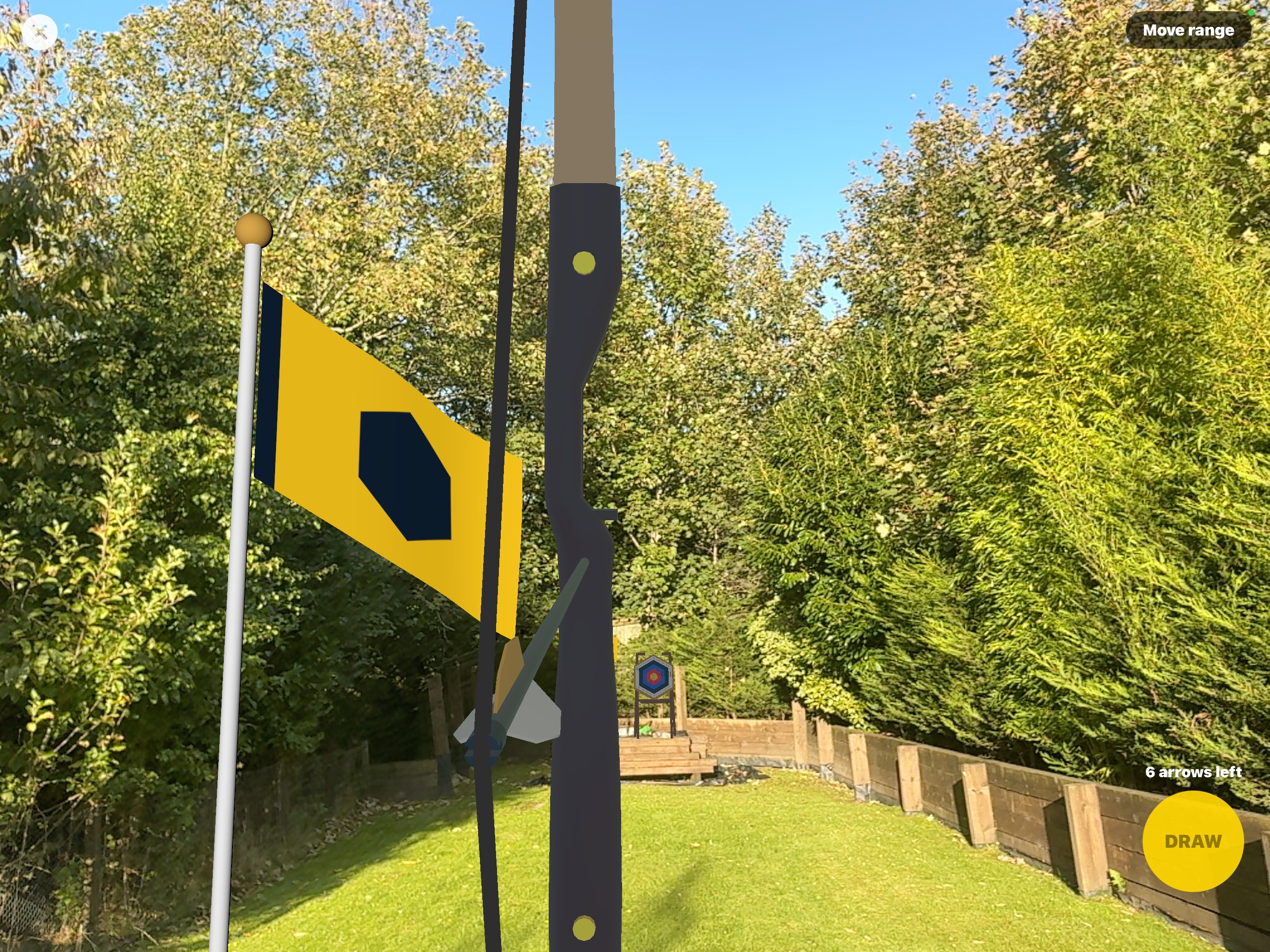
AR shows the bow and arrows with your camera view, plus the target and two virtual wind flags. It uses the game’s wind configuration, not a measurement of the weather around you. There is no Avatar, bow rack or rooftop scoreboard in this view.
AR controls: aim with the device and move to draw
Point the device to aim. Hold DRAW and move backwards through the clear space to pull the bow; move forwards again to ease the pull. Let go of DRAW to shoot. This differs from dragging the rooftop DRAW bar on the screen.
A metre of backward movement gives full draw. At the maximum overdraw the device gives a firm haptic signal: stop moving backwards because the bow will not pull any further. Check the space before moving and stop if it is no longer clear.
The arrows-left indicator counts down from six. Each shot reports its result, but this AR view does not show a cumulative scoreboard or save a best-round score.
After all six arrows have landed, tap Collect arrows on screen to start again. You do not need to walk to the virtual target in AR.
Choose Move range to clear the current placement and shots, then place the range again with a new direction or distance. Use the top-left X to leave Hex Arrow in AR and return to the building view. There is no separate Save step for the AR round.
If the range or shooting controls do not appear
No board or target: the property owner needs to save a Hex Arrow range in Terrace Settings, and the range must still fit the roof. When configuring it, try a shorter distance or a clearer position away from the roof edge, rooftop room and door.
The board says rooftop play is unavailable on this visit: enter through the building and climb the ladder to the roof room. A visit that arrived through the exterior roof-room door does not support the same rooftop game route.
No Ready an arrow: lower the bow if needed, return close behind the shooting line and check that arrows remain. At the end of a rooftop round, Collect arrows appears near the target instead.
AR tracking is unavailable: hold the device steady and let tracking recover. A loss of tracking during a draw cancels the pull. If the range has shifted after an interruption, choose Move range and place it again. Close and retry if the AR session reports an error.
Guide path
Move through HxAR one topic at a time.
New topics will be linked back into earlier guides whenever one action leads naturally to another.
Helpful now