
How To Topic 25 · HxAR Train
How to Own, Ride and Earn Fares from the HxAR Train
The Train connects qualifying virtual stations inside Search Location’s HxAR Metaverse. This guide follows the complete development flow: create the Railway footprint, add a Train, travel between your empty stations, carry another user and understand how a successful rider debit—and a separately saved and claimed owner receipt—move through Hx Vault.
What this guide achieves
Create a qualifying Train Station, travel safely between owned empty stations and verify recorded passenger fare spending or successfully claimed Train earnings in the correct Hx Vault activity category.
- Topic
- 25
- Starting point
- Four active HexTiles you own, or Search Location with HxAR selected
- Guide time
- About 12 minutes
- Screen status
- Development feature guide
Quick walkthrough
Own, ride and check Train fares in ten steps.
Build the exact four-tile Railway footprint first, then enter Search Location to drive, carry passengers and review the resulting HxElectrum records.
- 01
Own four eligible HexTiles in a straight line
Use four active virtual HexTiles that you own. They must be consecutive, all inside the same grid frame and arranged on one straight HexTile axis; three, five, bent, mixed or gapped selections do not unlock a Train Station.
- 02
Set all four tiles to Railway
Tap each tile in Search Location → HxAR Metaverse, open HexTile Options and choose Railway. All four tiles must remain actively owned by the same account.
- 03
Create the four-tile big property
In Property Management, choose Create big property, select exactly those four Railway tiles, name the station and review the HxElectrum development confirmation shown by the app.
- 04
Add the Train
At the Train Station prompt, choose Yes — Add Train. The Train belongs to the qualifying virtual station group; it is not bought as a separate physical or standalone item.
- 05
Create an empty destination station
Repeat the four-Railway-tile setup elsewhere in your owned network and choose No — Station Only. An empty qualifying station can receive the Train.
- 06
Open Search Location in HxAR mode
Enter Search Location and select HxAR. When your stationed Train enters the nearby moving grid, HxAR adopts it automatically without teleporting your Avatar.
- 07
Board fully and close the doors
Walk through the open doorway until the Avatar is fully inside the cabin, then use Close Door. The Train waits five seconds after closing and rises five virtual metres.
- 08
Choose an empty owned station
With one destination, choose Travel to the named station; with several, choose Choose Station. HxAR checks a route around known virtual properties and buildings before travel begins.
- 09
Understand passenger and elected-driver fares
An ordinary non-owner passenger successfully charged when boarding a peer-driven departure pays 0.10 HxE. A non-owner who takes control while the owner is away pays 0.10 HxE plus 0.10 HxE per verified kilometre, capped at 3.00 HxE. Owners ride their own Train free.
- 10
Check HxElectrum Activity
In Hx Vault, open HxElectrum Activity. If its separate activity record saved successfully, the rider’s debit appears as Train fare under Spending. If the pending owner receipt was also saved, opening or refreshing Hx Vault attempts to claim it; after a successful owner credit and activity save, Train earnings appears under Earnings.
The Train is a virtual Search Location feature
The Train appears in Search Location when HxAR mode is selected. It uses HxAR’s virtual HexTile grid, Avatar and multiplayer presence rather than representing a real railway service, ticket, surveyed boundary or physical land right.
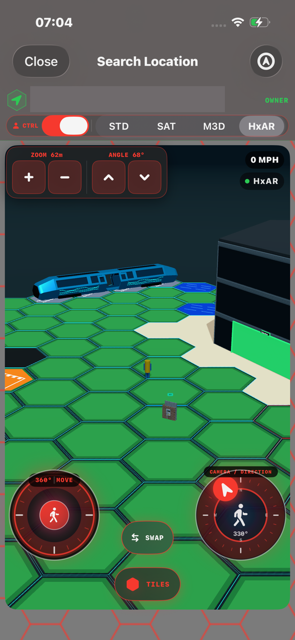
The supplied development screenshot shows the blue Train, the green OWNER status, HxAR mode, the walking and camera-direction controls, and the virtual property grid. Its exact tile reference and coordinates are deliberately hidden on the website so the image can explain the interface without publishing a precise location.
A Train starts with one exact four-tile Railway station
A Train is not a separate store purchase. The entitlement comes from a Big Property containing exactly four active, currently owned Railway HexTiles in one straight consecutive line. Every tile must belong to the requesting account and sit in the same HxAR grid frame.
Set the four tiles to Railway in HexTile Options, then use Create big property in Property Management and select only those four tiles. Name the group and complete the HxElectrum development confirmation displayed by the app. The amount can depend on the property-development state, so this guide does not replace the confirmation shown before saving.
When the Train Station choice appears, Yes — Add Train creates a stationed Train and No — Station Only creates an empty station. The Train Station prompt and Search Location controls described here reflect the current development source.
Qualifying footprint
Exactly four unique, consecutive Railway HexTiles on one straight q, r or s HexTile axis.
Ownership requirement
All four virtual ownership entitlements must be active and held by the same HxAR account. Assignment alone is not ownership.
Train Station choice
Choose Yes — Add Train for the starting station or No — Station Only when you need an empty destination.
The Train travels only to an empty station in its owner’s network
Build at least one additional qualifying four-tile Railway group under the same owner and leave it empty with No — Station Only. The destination list contains the Train owner’s empty qualifying stations; a station holding another Train is not offered.
After a successful arrival, the Train is stationed at the destination and the source becomes empty. That makes the former source available for a later return journey. HxAR presents one local interactive Train at a time even when an owner has more than one qualifying station in the wider network.
If there is no empty destination, the hovering action lands the Train again instead of offering a trip. Removing the qualifying four-Railway-tile footprint also removes that Train Station state.
Board fully before using Close Door and choosing a station
When an owned stationed Train enters the nearby moving grid, Search Location adopts it automatically. Your Avatar stays where it is, so walk through the open doorway and fully inside the cabin before trying to start the journey.
Close Door begins the controlled sequence. The doors close, HxAR waits five seconds and the Train rises five virtual metres. If one empty destination is available, the action names it; if several are available, Choose Station opens their list.
Before movement starts, HxAR verifies a virtual route around the properties and buildings it can load for the corridor. If no verified route can be produced, no journey starts. At the destination, the Train lands, waits five seconds and opens the doors.
Passengers board by walking in; an owner-absent Train can offer Take Control
There is no separate Board button. Another opted-in user walks into the cabin before departure. When a peer-driven Train leaves with that user inside, HxAR captures the passenger’s position in the mirrored cabin and carries the Avatar with the Train.
When a non-owner is fully inside a parked Train and its owner is absent, Take Control can appear. The first eligible user to take control becomes the elected driver and everyone else aboard travels with them. A returning owner remains the authority for their own Train.
Live passenger presence depends on HxAR’s optional multiplayer connection and the supported Search Location scope. A temporary visibility gap can be tolerated, but live presence and ride state are not a permanent passenger manifest or travel history.
Owners ride free; other successfully charged journeys use HxElectrum
The current development fare unit is the Mite: 100 Mites equals 1 HxE. Fare arithmetic stays in whole Mites. When a total contains an odd Mite, the owner share rounds down and the extra Mite remains in the economy sink.
A fare is best-effort in this development build. If the rider has insufficient HxElectrum or the debit cannot be completed, the journey is not blocked and no owner earning is created. After a successful rider debit, the owner receipt is saved separately; a receipt-save or later claim failure also means no owner credit until a valid pending receipt can be claimed.
Train owner · own network
Free. Driving or riding a Train attached to your own station network creates no fare.
Ordinary passenger · peer-driven departure
0.10 HxE once for the boarded ride. The configured split is a 0.05 HxE owner cut and a 0.05 HxE economy sink; the owner cut becomes claimable only when its pending receipt is successfully saved.
Elected non-owner driver
0.10 HxE base plus 0.10 HxE per verified kilometre, clamped between 0.10 and 3.00 HxE for the trip.
Train owner’s share
The configured cut is 50% of the successfully charged fare, floored to a whole Mite. It reaches the owner only after the pending receipt is saved and successfully claimed; the equal or larger sink remainder is never credited to another wallet.
Train fares land in HxElectrum—not Tokens, Tile Yield or Ore
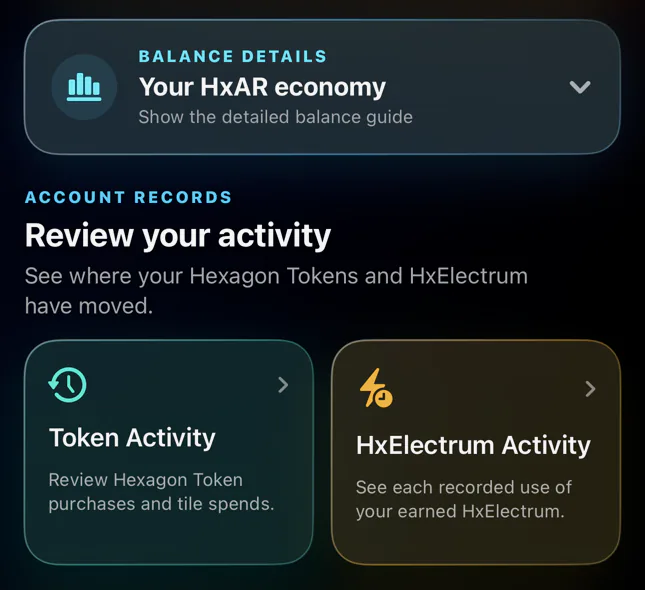
For the rider, the whole successful fare is deducted from the HxElectrum balance. The app then separately tries to save the best-effort records: when those saves succeed, the rider receives a Train Fare notification and the debit appears in Hx Vault → HxElectrum Activity → Spending with the reason Train fare. A record-save failure does not undo the authoritative balance debit.
After the debit, the rider’s app separately tries to save a Train Earnings notification carrying the owner’s pending receipt. If that save succeeds, opening Hx Vault, tapping refresh or pulling to refresh attempts to claim the receipt into the owner’s HxElectrum balance. Only a completed credit appears in HxElectrum Activity → Earnings with the reason Train earnings.
A notification, activity-record, receipt-save or claim failure can leave a balance change without the corresponding visible record or owner earning. The owner credit never appears in Hexagon Tokens, producing Tile Yield, Electrum Ore ready on a tile, Ore Powder or the Ore Reserve, and the sink portion never enters another user’s Hx Vault. The current owner-claim path is an interim, best-effort development settlement rather than a promise of immediate or final server-settled payment.
Treat route checks, speed and ownership as virtual-only
A verified Train route avoids the virtual properties and buildings known to the current route check. It does not follow real railway infrastructure, inspect roads, detect people or physical obstacles, grant access, or certify that moving with a device is safe.
Use Search Location while stationary or seated where possible. Never operate HxAR while physically driving or crossing a road, and stop before reading controls while walking. Remain aware of steps, water, traffic, other people, restricted places and private property.
The main Train actions, destination menu, Take Control and cabin camera switch have dedicated accessibility labels or hints, and the compact buttons target a 44-point height. The 3D cabin, doorway, station geometry, other Avatars and spatial route remain highly visual, so real-device VoiceOver, Larger Text, Switch Control, motion and one-handed-use testing is still required.
The Train, fares and owner settlement remain development features and can change before their public release. HxElectrum is an in-app virtual resource, not cash, cryptocurrency, a bank balance, an investment or a guaranteed return.
Guide path
Move through HxAR one topic at a time.
New topics will be linked back into earlier guides whenever one action leads naturally to another.
Helpful now