
How To Topic 02 · Hx Vault
How to Use Hx Vault in HxAR 2.0
Hx Vault brings the Hexagon Token balance and the complete virtual-resource journey into one place. Follow the flow from producing HexTiles to ready Ore, collected Ore Powder and refined HxElectrum.
What this guide achieves
Open the full Hx Vault, distinguish each in-app balance, collect Ore before the tile-storage limit and refine eligible Ore safely.
- Topic
- 02
- Starting point
- Yellow Hexagon Vault control on the HxAR dashboard
- Guide time
- About 8 minutes
- Screen status
- HxAR 2.0 release guide
Quick walkthrough
Use Hx Vault in seven steps.
Open the Vault from the dashboard, read the resource flow, then collect, refine and review only the actions available to your account.
- 01
Open the Hexagon Vault from the dashboard
Tap the yellow hexagon at the upper left of the HxAR dashboard. It shows the Hexagon Vault in AR; use its link to enter the full Hx Vault.
- 02
Read the four-stage resource journey
Use the overview to distinguish producing HexTiles, ready Ore, collected Ore Powder and the HxElectrum balance.
- 03
Buy Hexagon Tokens only when you choose
The Buy Tokens control opens the in-app token store. Review Apple’s displayed product and price before confirming any optional purchase.
- 04
Collect Electrum Ore that is ready
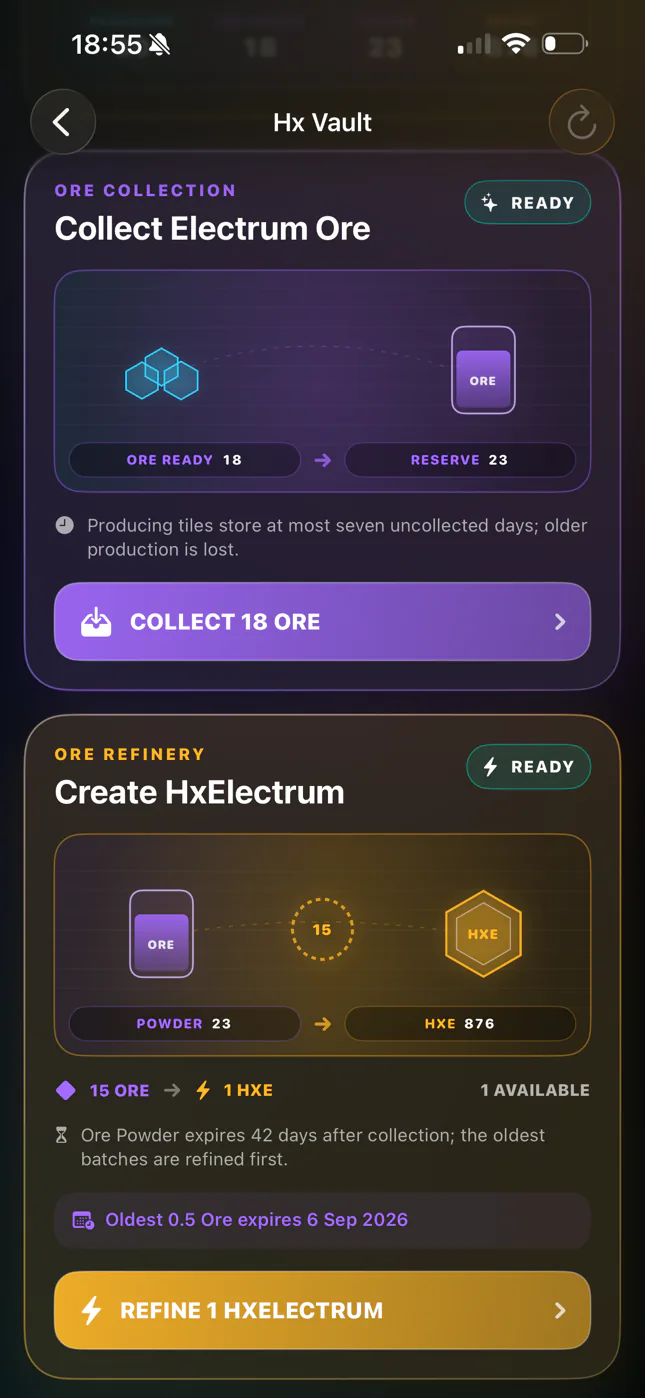
When the collection card says Ready, select Collect Ore to move all currently available production from eligible tiles into your Ore Reserve.
- 05
Refine an eligible Reserve batch
When at least 15 Ore is available and the Vault is not busy, select Refine 1 HxElectrum. The oldest eligible Ore is used first.
- 06
Review balances and activity
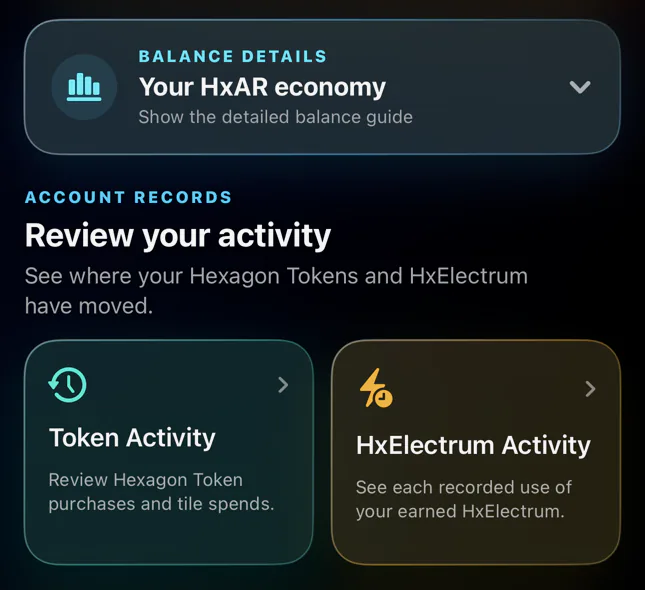
Expand Your HxAR economy for detailed balances, or open Token Activity and HxElectrum Activity to inspect records including Train fare spending and credited Train earnings.
- 07
Refresh or return to the dashboard
Use the refresh control when no Vault operation is running, or use Back to return directly to the HxAR dashboard.
Open Hx Vault from the first dashboard control
The yellow hexagon is the first control at the upper left of the signed-in HxAR dashboard. Tapping it shows a 3D Hexagon Vault in the camera view together with a route to the full Hx Vault. Follow that route to reach the scrollable screen shown in these images.
The back control at the upper left returns directly to the normal HxAR dashboard. The circular arrow at the upper right, and pull-to-refresh, check active owned tiles and reload Ore and HxElectrum balances. Refresh is unavailable while the Vault is scanning, loading, collecting or refining.
Read the Hx Vault overview before taking an action
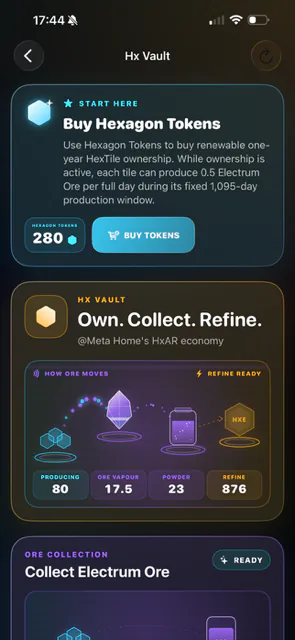
The Own. Collect. Refine. panel summarises the journey without turning every balance into the same thing. Producing HexTiles create ready Electrum Ore; collection moves that Ore into the Reserve as Ore Powder; refinement converts an eligible Reserve batch into HxElectrum.
The Refine Ready label means the Reserve currently holds enough Ore for at least one refinement. It does not refine anything automatically, and the Refine figure is the current HxElectrum balance rather than a count of available refinements.
The values visible in the supplied screenshots belong to the captured development account. They are examples, not starting balances, guarantees or promised rewards.
Hexagon Tokens
Optional consumable in-app credits purchased through Apple and used by this development flow to buy eligible virtual HexTiles.
Producing
The number of actively owned HexTiles that are still inside their fixed Ore-production window.
Ore ready
Uncollected Electrum Ore currently held by producing tiles and available to move into the Reserve.
Ore Powder · Reserve
Electrum Ore already collected into Hx Vault. Reserve batches have their own collection dates and expiry times.
HxE · HxElectrum
The refined in-app resource shown at the final stage of the Vault journey.
Buying tokens is optional and HexTile ownership is virtual
The Buy Hexagon Tokens card displays the account’s current token balance and opens the in-app store. Apple shows the authoritative local price and purchase confirmation. Do not continue unless the product and price are what you intend to buy.
Buying Tokens is optional, although obtaining an eligible HexTile can require an App Store token purchase. Purchased Hexagon Tokens do not expire in the current source. The virtual HexTile entitlement, ready Ore held by a tile and collected Ore in the Reserve follow separate time rules.
In the documented HxAR 2.0 model, Hexagon Tokens buy renewable one-year virtual HexTile ownership. Returning to HxAR signed in before an active entitlement’s deadline renews it without another token charge; missing the deadline makes the tile available again. This is an in-app entitlement only: it does not provide physical land ownership, title, tenancy, access or permission to enter a real location.
While an eligible ownership entitlement is active, each producing tile can create 0.5 Electrum Ore per full day during a fixed 1,095-day production life measured from the tile’s first purchase. A change of owner does not restart that production life.
Collect ready Electrum Ore before tile storage is lost
A producing HexTile adds 0.5 Ore for each complete 24-hour period and stores at most seven uncollected production days, equal to a maximum of 3.5 ready Ore per producing tile. Older uncollected production is lost, so the Ready amount should be collected regularly.
When the status shows Ready, the Collect button moves all displayed ready Ore from eligible active owned tiles into the account’s Ore Reserve. If the Vault is checking tiles, collecting, refining or reporting an error, wait or follow the on-screen retry message before trying again.
Refine 15 Ore into 1 HxElectrum
The refinery becomes available when the Reserve contains at least 15 Ore and another Vault operation is not running. The available count is the whole number of 15-Ore batches in the Reserve. Each tap of Refine 1 HxElectrum uses one 15-Ore batch and adds 1 HxElectrum; nothing happens automatically. HxElectrum does not expire in the current development rules.
Collected Ore Powder expires 42 days after collection. The refinery uses the oldest eligible batches first, and the expiry notice identifies the oldest batch shown by the account. Expired Ore is removed when the Vault refreshes.
The development build uses HxElectrum for actions such as merging HexTiles, creating building floors, uploading USDZ assets and entering Remote 2 Player Snooker at 1 HxElectrum per player. The final costs and eligible actions remain subject to the confirmation shown in the app.
Use balance details and activity records to understand movement
Select Your HxAR economy to expand a readable breakdown of Hexagon Tokens, owned and producing HexTiles, ready and Reserve Ore, and HxElectrum. This explanation is more reliable than trying to read the small figures from a screenshot.
Token Activity opens records of Hexagon Token purchases and HexTile spending, with date and credit-or-debit filters, reason search and refresh. HxElectrum Activity shows recorded HxElectrum use, its current balance and the loaded-use total. When the separate best-effort activity records save successfully, a charged passenger ride appears as Train fare under Spending and a credited owner share appears as Train earnings under Earnings.
When the rider’s app successfully saves a pending Train Earnings receipt, opening or refreshing Hx Vault attempts to claim it into the owner’s HxElectrum balance. A completed claim appears as Train earnings under Earnings; a failed receipt save or claim creates no credited owner earning. Train earnings do not enter Hexagon Tokens, Tile Yield, Electrum Ore or the Ore Reserve, and this remains a development mechanism rather than a cash, bank or investment product.
The supplied capture also contained Developer Diagnostics because it came from a debug build. That engineering-only card has been cropped out of the website image because it is not a standard user feature and its wording is not final.
Treat every Vault balance as an in-app virtual resource
Hexagon Tokens, Electrum Ore and HxElectrum are platform features. They are not cash, a bank balance, cryptocurrency, an investment, an earnings product or a guaranteed return.
The screenshots and figures document the reviewed HxAR 2.0 interface. Rules, labels, costs and availability can change in later app updates; the confirmation shown in the app is authoritative.
Guide path
Move through HxAR one topic at a time.
New topics will be linked back into earlier guides whenever one action leads naturally to another.
Helpful now