
How To Topic 09 · Collectables
How to Find, Claim and View Collectables in HxAR
Your Collectables can become part of the experience: inspect a motorbike in your own surroundings with View in AR, or use a supported vehicle in the HxAR Metaverse. Start in My Collectables to see what you own, including eligible HexTile purchase rewards. GEO discoveries still need claiming before their timers end, while the Exchange has its own protected status.
What this guide achieves
Find your rewards, view them in AR and explore with supported Metaverse vehicles.
- Topic
- 09
- Starting point
- Signed-in HxAR dashboard with the outer navigation dial
- Guide time
- About 10 minutes
- Screen status
- Next app update preview
Quick walkthrough
Use Collectables in ten steps.
Open your collection, check how each item was acquired, and try its supported experiences. The sections below explain AR viewing and using vehicles in the Metaverse.
- 01
Open Collectables from the dashboard
Rotate the outer dashboard dial until Collectables appears, let the dial settle, then tap the shortcut.
- 02
Read the owned count and setup banner
The count shows the owned grant records currently loaded for the signed-in account. Use Manage when background pocket discovery still needs setting up.
- 03
Choose the correct tab
Use My Collectables for claimed or awarded items, Discoveries for account-specific GEO offers and Exchange only to check its protected development status.
- 04
Receive an eligible HexTile reward
When buying an eligible virtual HexTile, review the current collectable odds before confirming. The purchase screen says either Exactly one reward or Tile only.
- 05
Enable Nearby Collectables only if wanted
Open Manage, scroll to Nearby Collectables and review the location and notification choices before enabling background pocket discovery.
- 06
Use HxAR normally and stay safe
A qualifying crossing into another broad discovery cell may create an offer, but no crossing or journey guarantees one and HxAR deliberately provides no exact target to chase.
- 07
Claim a discovery before its timer ends
Open Discoveries, read the area and countdown, then select Claim Collectable while the offer still says it is available.
- 08
View an owned collectable in AR
Open My Collectables and select View in AR. Wait while the USDZ file is prepared, then place it on a clear horizontal surface.
- 09
Place an item in the HxAR Metaverse
In the normal HxAR Metaverse view, tap an individual HexTile you own, choose Add asset, then My Collectables and Place Collectable. Each owned copy can stand on one HexTile at a time. Supported vehicles can be entered or ridden using their own controls; see the examples below.
- 10
Treat Exchange as protected development work
The current app can display trusted listing and trade records, but it cannot list, buy, counter, accept or transfer a collectable from the device.
Open Collectables and explore your collection
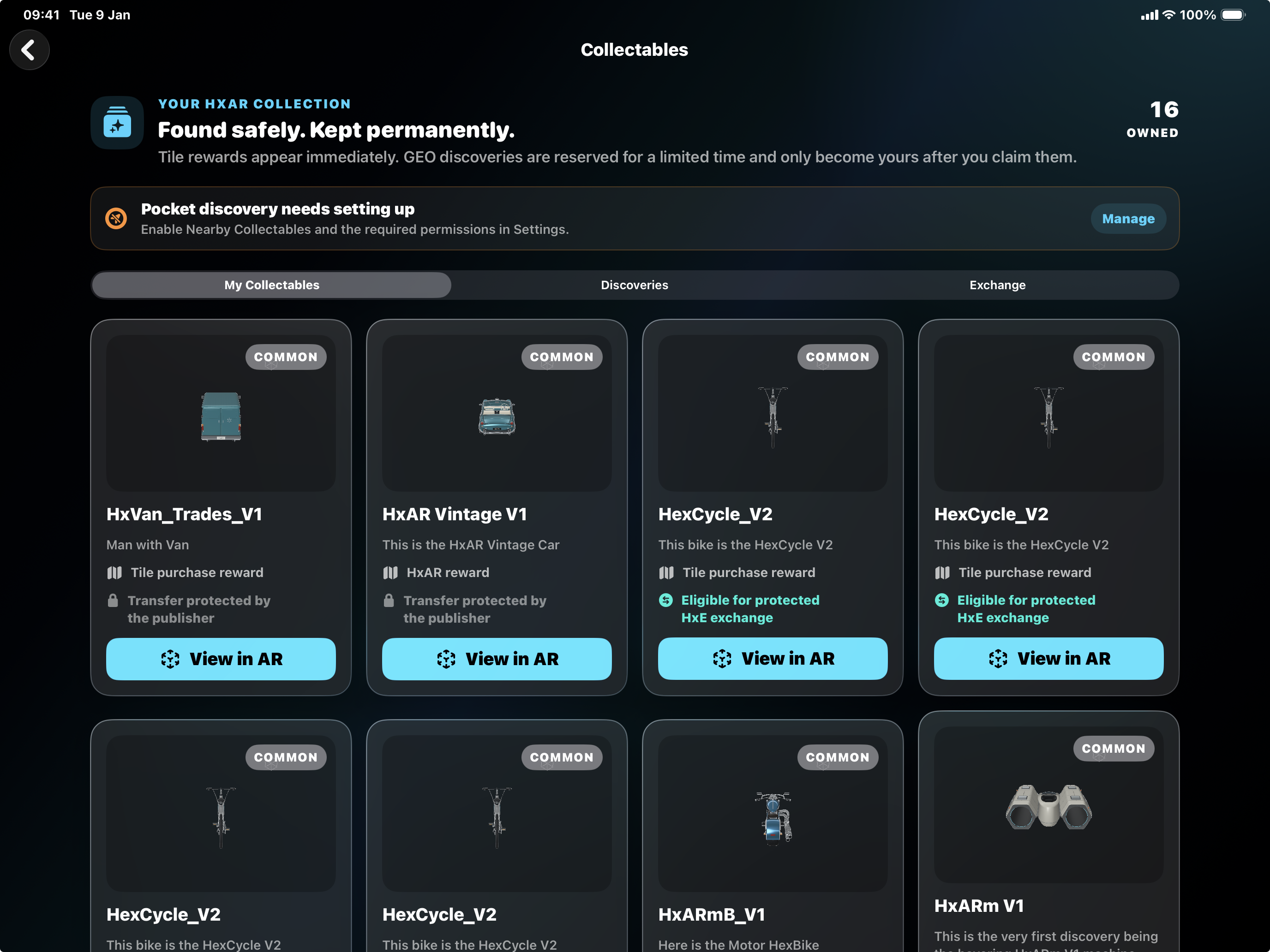
Collectables is one of the destinations on the rotating outer dashboard dial. Rotate until its shortcut is visible, allow the dial to settle and tap it. The back control returns to the previous screen.
The 16 OWNED count in this screenshot belongs to this signed-in account. It is not a collection limit, a lifetime total or a promise that every account receives these same items. HxAR loads further pages for larger collections. No collectables yet is the normal presentation when an account has no owned items; Loading Collectables or an information message describes a different state.
The screenshot includes a van, a vintage car, several HexCycle bikes, a motorbike and another vehicle. Some cards say Tile purchase reward and another says HxAR reward. Read the source on each card: the picture is an example collection, not a fixed set included with every HexTile purchase. A tile review can say Tile only, and a qualifying GEO crossing can still produce no offer.
The headline Found safely. Kept permanently. is the app’s interface wording. In the current grant model, a claimed or awarded collectable has no built-in expiry date. That wording is not a guarantee that a cloud service, account or asset file will exist forever, and a future trusted transfer could change the owner of a transferable item.
View an owned collectable and understand its record
An owned card shows its title, description, rarity and acquisition source. A GEO item names the broad area where it was discovered. A tile reward is labelled Tile purchase reward. An administrator-issued item is labelled HxAR reward.
The card also says whether the publisher marked that item transferable. Transfer protected by the publisher means the current grant is not eligible for a future exchange. Eligible for protected HxE exchange describes its policy status; it does not mean the Exchange is already able to transfer it.
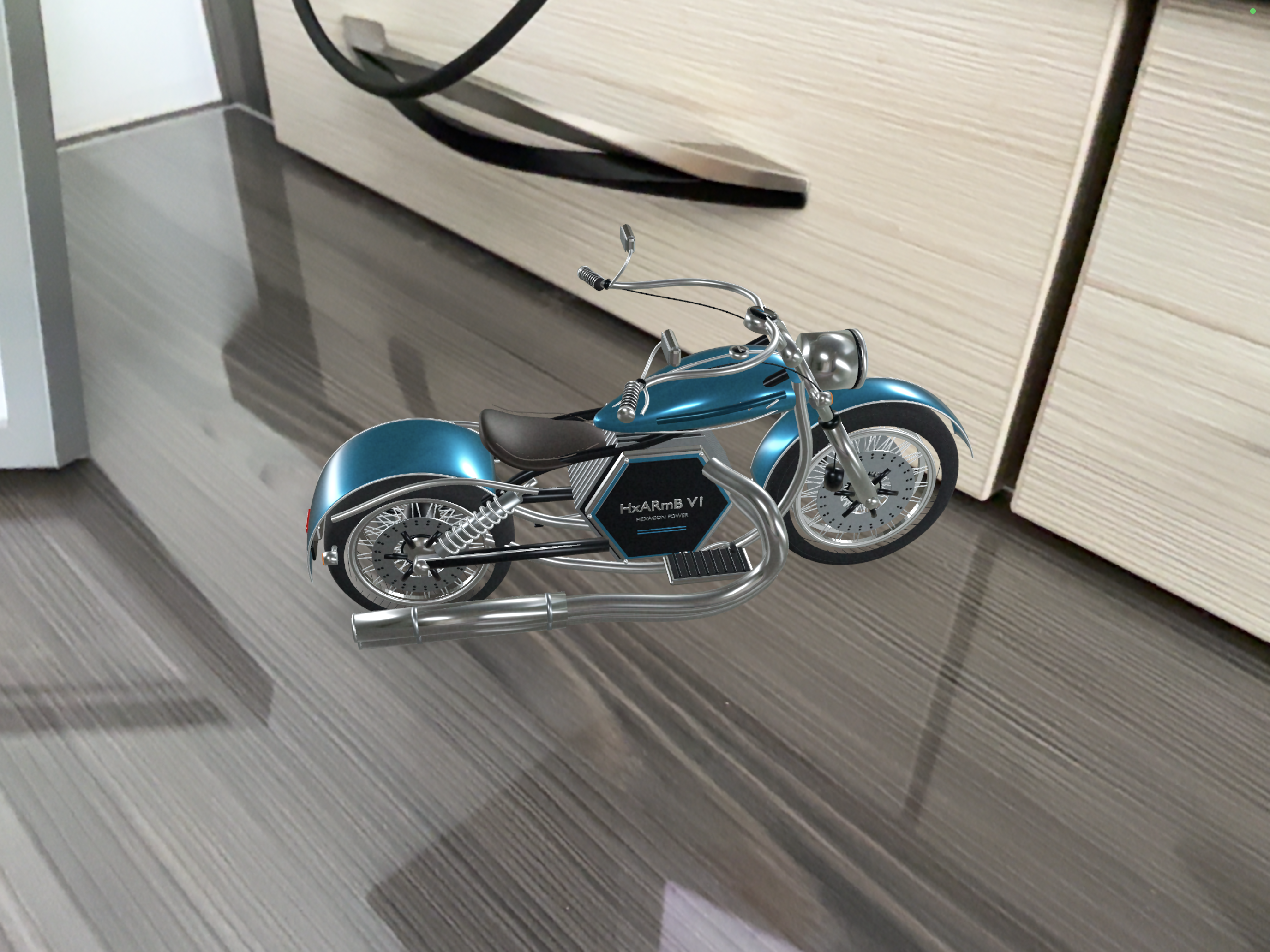
Select View in AR to fetch the catalogue USDZ file, copy it into the app’s cache and open HxAR’s AR viewer. The viewer looks for a horizontal surface, places the model when one is found and supports pinch scaling. Use a clear, well-lit space and remain aware of people, furniture, steps and other hazards.
Collectables and AR Gallery are separate systems. Claiming or receiving a collectable does not copy it into Saved AR Assets, and the current Collectables card does not provide an export or route into AR Gallery.
Bring your Collectables into the HxAR Metaverse
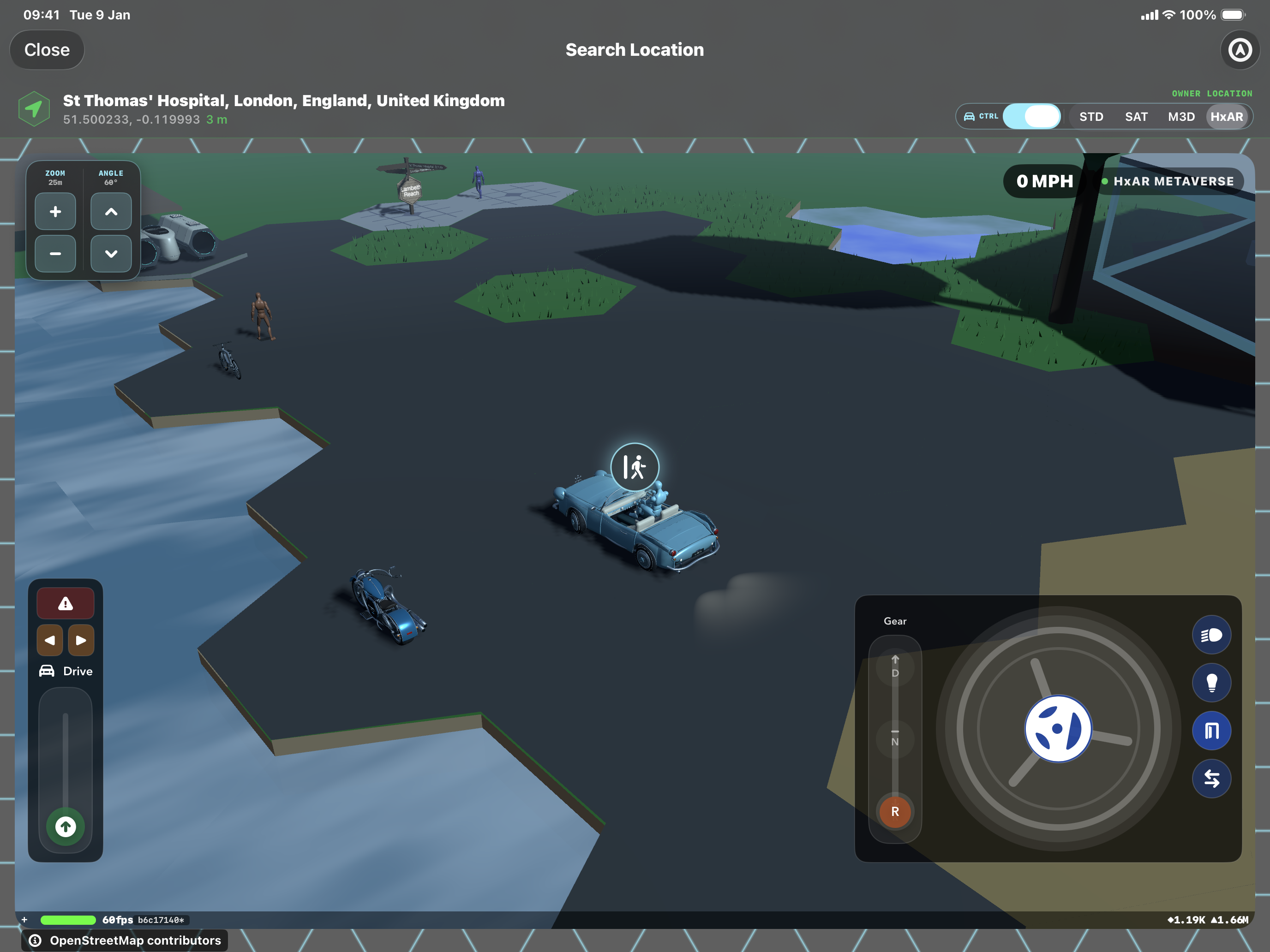
View in AR and Metaverse placement are two different ways to enjoy an item. To place one in the virtual world, use the normal HxAR Metaverse view, tap an individual HexTile you currently own and choose the cube-shaped Add asset control. Open My Collectables, choose an available owned item and select Place Collectable. If the tile already has an asset, the action may say Replace with Collectable.
Each awarded copy can be placed on one HexTile at a time. To move it elsewhere, use Remove Asset on its current tile first. Removing a placement does not require you to buy or claim the Collectable again. The Land View ownership screen and the building purchase paper are separate from this placement route.
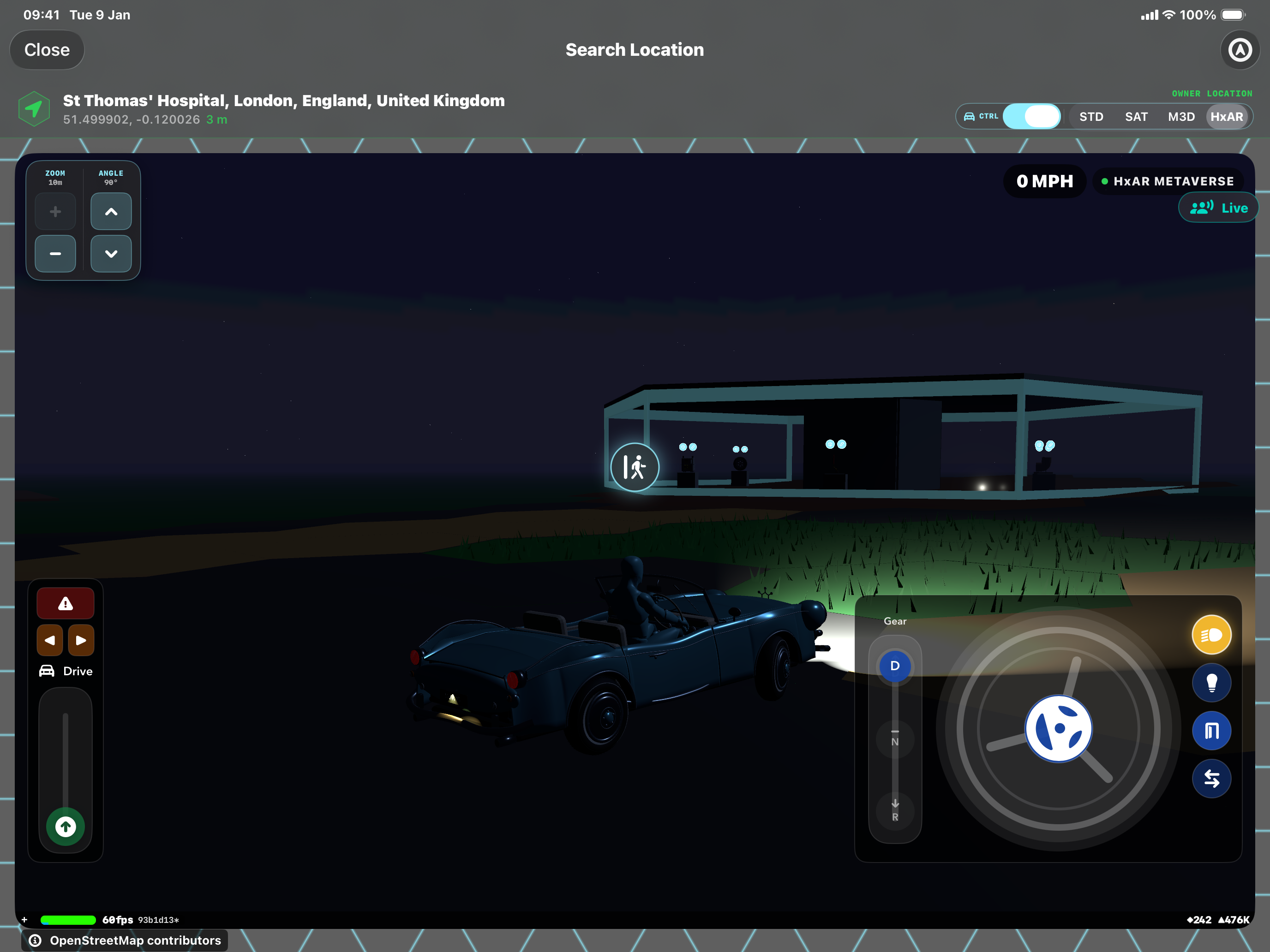
For a supported vintage car or trades van, approach the placed vehicle with your avatar on foot and tap the vehicle to get in. Select D or R, drag the green Drive accelerator upward and use the steering wheel. Release the accelerator to slow down. The walking or get-out control lets your avatar leave the vehicle.
The headlight beam button switches the car’s headlights on or off. The separate bulb button controls its interior lights. Bikes, motorbikes and other supported vehicles have their own riding controls, so the car controls shown here do not apply to every Collectable.
My Collectables, Discoveries and Exchange are different
My Collectables loads the account’s owned items, including further pages when needed. Discoveries shows account-specific GEO offers, including available, claimed and expired states; its current list shows up to 100 offers. Exchange displays active listings and the signed-in account’s recorded trade activity when trusted server records exist.
The header count belongs to My Collectables even when another tab is selected. An available discovery is only a reservation; it does not increase the owned count until a successful claim creates the account’s grant.
Pull down to refresh when a notification or recent action has not appeared. Loading and claims need a valid HxAR sign-in and CloudKit connection.
A HexTile purchase can include one disclosed random reward
The map’s Review Tile Purchase sheet loads the collectables currently eligible for the signed-in account before the user can confirm a virtual HexTile purchase. It shows the chance of receiving a collectable, rarity odds and individual item odds. If the eligible list is not empty, the screen says Exactly one reward; if it is empty, it clearly says Tile only.
The eligible set can depend on availability dates, distribution settings, duplicate rules and collectables the account already owns. The catalogue also stores a maximum-supply value, but the reviewed client does not enforce it when calculating eligibility. If the eligible set changes while the purchase sheet is open, HxAR stops the purchase and asks the user to review refreshed odds rather than silently using different odds.
A successful eligible tile purchase normally creates the collectable grant immediately and shows its title and rarity in the confirmation. The HexTile entitlement and the collectable are separate records: the tile follows its renewable one-year ownership rule, while the collectable grant has no expiry field.
These rewards apply to eligible individual HexTile purchases. Buying a Micro Mapped Property or a Mapped Plot Bundle does not currently award a Collectable through that purchase route. Check the offer you are actually reviewing instead of assuming every kind of property purchase includes a reward.
Hexagon Tokens and collectables are virtual HxAR service features. They are not cash, cryptocurrency, investments, winnings or real-property rights. Apple shows the price before a Token purchase, and HxAR must continue disclosing the random-reward odds before the related virtual-tile purchase.
Pocket discovery is optional and begins with a safe baseline
If the banner says Pocket discovery needs setting up, select Manage to open Settings, then scroll to Nearby Collectables. The feature switch is stored on that device. Turning it on starts Apple’s permission flow; turning it off stops HxAR’s significant-location monitoring but does not revoke an Apple permission or remove earlier offers, grants, notifications or local attempt history.
Always Location is needed for background significant-location monitoring when HxAR is not being actively used. Notification permission allows a Lock Screen alert but is not the same permission as location. The banner’s active state checks that the feature is enabled, background monitoring is running and Always Location is allowed; it does not prove that system alerts are enabled.
When monitoring begins, HxAR records the current coarse area as a baseline. The starting position does not count as a crossing. Verified foreground locations can also enter the same discovery process while the feature is enabled.
Crossing a broad GEO area does not guarantee a discovery
HxAR converts a recent verified location into an approximately 400-metre discovery cell. After a baseline exists, moving into another cell can become an eligible crossing. The offer stores the coarse cell identifier and a broad place name rather than an exact target coordinate, although the device location is still accessed to calculate the cell and resolve that area name.
Only a recent verified GPS update enters this process. Entering coordinates into Map Search or moving a map does not manufacture a crossing or create a discovery offer.
A crossing can be ineligible because the campaign is paused, the cell was already attempted during that UTC day, the daily limit was reached, a cooldown is active or no suitable catalogue asset is available. Even an eligible crossing can be a miss. No crossing guarantees an offer.
The source’s fallback development campaign uses a 1-in-20 chance for an eligible crossing, up to three attempts per UTC day, a four-hour cooldown and a guaranteed offer after 20 consecutive misses. Live campaign values can be changed through CloudKit and are not displayed on this normal Collectables screen, so those fallback figures are not a promise of the current live rate.
Do not travel, trespass, cross a road or enter an unsafe or restricted place to trigger a discovery. HxAR deliberately does not reveal a precise collectable target. Use the feature as a background addition to normal, lawful movement rather than as navigation.
A GEO discovery becomes yours only after a timely claim
A successful discovery creates an account-specific offer and can add both an Apple notification and an item to HxAR’s notification feed. The Lock Screen alert can include the collectable title and broad area, so review Apple’s notification-preview setting if that information should stay hidden. Open Discoveries directly or follow a supported Collect action from the notification.
An offered card shows the collectable title, rarity, broad discovery area and a live Claim within countdown. The standard catalogue setting is 24 hours, but each asset can use a different configured duration, so follow the timer on the actual card rather than assuming every offer lasts a full day.
Select Claim Collectable before the timer reaches zero. Claiming is free: it does not debit Hexagon Tokens or HxElectrum, and the claim service does not require you to remain at or revisit the discovery area. A successful claim creates the owned grant, marks the offer claimed and reloads the hub.
If the timer ends first, the card reports Claim window ended · asset recycled. Recycled means that the temporary account reservation ended; the item was never added to My Collectables. It does not mean the underlying catalogue asset is unique, scarce or unavailable to every other account.
Exchange is visible, but settlement is deliberately disabled
The Exchange tab presents a Protected HxAR Exchange banner and can read active listing or trade records written by a trusted service. The shipping client currently sets trusted settlement to disabled.
There is no working on-device action to create a listing, request a purchase, make a counteroffer, accept, decline, cancel, debit HxElectrum or change ownership. Listing cards therefore show Your listing or Secure requests are protected instead of an enabled transfer button.
Do not send somebody money, disclose credentials or arrange an off-platform transfer because a listing appears. HxElectrum is an in-app virtual resource, not legal tender, and the website does not promise a date when Exchange settlement will become available.
The reviewed Exchange screen also has no dedicated in-app Report listing or Block user control. Use the website Report Content or Support route for a concerning preview record; future interactive trading needs appropriate reporting, blocking, moderation and dispute handling before release.
Understand the cloud records and the current deletion gap
Owned grants are account-linked records in HxAR’s public CloudKit database containing an owner identifier and reference, catalogue-asset reference, acquisition source and date, title and description snapshots, rarity, transferability and—where relevant—a broad discovery area. Offers additionally contain the coarse cell identifier, discovery and expiry times, status and campaign reference. Account-linked does not prove that the CloudKit records are private, anonymous, end-to-end encrypted or unreadable by others; those permissions require a separate deployment audit.
Local device storage holds the Nearby Collectables switch, coarse attempt history, notification markers and cached AR preview files. Turning discovery off does not remove those earlier records. Deleting the app also is not the same as deleting the HxAR account or its CloudKit data.
The reviewed HxAR 2.0 account-deletion path did not explicitly sweep CollectibleGrant, GeoCollectibleOffer, CollectibleListing or CollectibleTrade records. That app-side privacy behaviour still requires verification against the App Store build. Until that verification is documented, this website must not promise that Delete Account removes every Collectables record; contact Support about affected data.
Use the readable guide and recover from common problems
The screenshot’s small labels and muted explanatory copy are repeated here as normal HTML text. The segmented tabs and labelled buttons use native controls, but the cards lack dedicated accessibility grouping and the AR viewer relies on visual surface detection and pinch scaling without a spoken placement state or separate accessible scale control. The complete Larger Text, contrast, touch-target and VoiceOver journey still needs final review before HxAR 2.0 can be described as fully accessible.
If the hub says Sign in to see your collectables, return to the normal account flow. If it keeps loading or shows a CloudKit message, check the connection and pull down to refresh. If an AR file is unavailable, try again later without repeatedly claiming or buying the same item.
If pocket discovery stays inactive, confirm the Nearby Collectables switch, Always Location status and whether significant-location monitoring is available on the device. Notification permission affects alerts, while the Collectables tab can still be checked manually. If an offer expired, it cannot be reclaimed from that card.
If a tile purchase completed but its expected reward is missing, keep the confirmation details and contact Support. The reviewed client logs the failed award as pending, but no automatic or user-facing reconciliation path was confirmed.
Guide path
Move through HxAR one topic at a time.
New topics will be linked back into earlier guides whenever one action leads naturally to another.
Helpful now